Showing posts with label tsakadoll. Show all posts

How to customize the scrollbar in your web page

To customize the look-and-feel of the scrollbar in your web page, paste the CSS Code below to the style sheet of your template. Just replace the values(e.g. #4293E4) of the scrollbar properties(e.g. scrollbar-face-color) with your preferred color names/hex values.

CSS Code:
body, html {
  scrollbar-face-color: #4293E4;
  scrollbar-track-color: #607183;
  scrollbar-arrow-color: #FFFFFF;
  scrollbar-shadow-color: #527AA8;
  scrollbar-darkshadow-color: #374A5F;
  scrollbar-highlight-color: #B4D8FC;
  scrollbar-3dlight-color: #73AAE9
}


To better edit the CSS Code above, see and analyze the scrollbar diagram below: (click to enlarge picture)


Note:
» Customization of scrollbar colors is supported only in Internet Explorer.
» Scrollbar properties are invalid CSS information.


Good luck! :)


How to customize the scrollbar in your Blogger blogs:

For New Blogger Layout users, paste the CSS Code above to your template, somewhere before this:
]]></b:skin>
  </head>


For Classic HTML Template users, paste the CSS Code above to your template, somewhere before this:
</style>
  </head>


Good luck! :)

How to hide the Blogger Navbar

Before you hide the Navbar of your Blogger blog, take another look at its features first. (click the diagram below)


To hide the navbar, paste the code below to the style sheet of your Blogger layout/template.

Code:
#navbar-iframe {
display: none !important
}


For New Blogger Layout users, paste the code above to your template, somewhere before this:
]]></b:skin>
  </head>


For Classic HTML Template users, paste the code above to your template, somewhere before this:
</style>
  </head>


Good luck! :)

Google Account Deletion

Here's how you can delete your Google account in case you want to do so.

1. Sign in to your Google account.
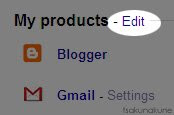
2. Go to your My Account page, then, click the Edit link next to My Products label. See the diagram below...

click "edit" link
3. Read all the information on that page carefully before choosing to delete your Google account.


For more information, you can go here >>
http://www.google.com/support/accounts/bin/answer.py?hl=en&answer=32046

Yahoo! Account Deletion

How to delete your Yahoo! account?

1. Sign in to your Yahoo! account.
2. Go here after signing in >> https://edit.yahoo.com/config/delete_user
3. Read all the information provided on that page carefully before choosing to terminate your Yahoo! account.


For more information, you can go here >> http://help.yahoo.com/l/us/yahoo/edit/changing_users/edit-23.html

Free Banner

Click to enlarge image.

Title: HAYOOP!
By: tsakadoll
Type: banner / image
Dimensions: 434 x 105